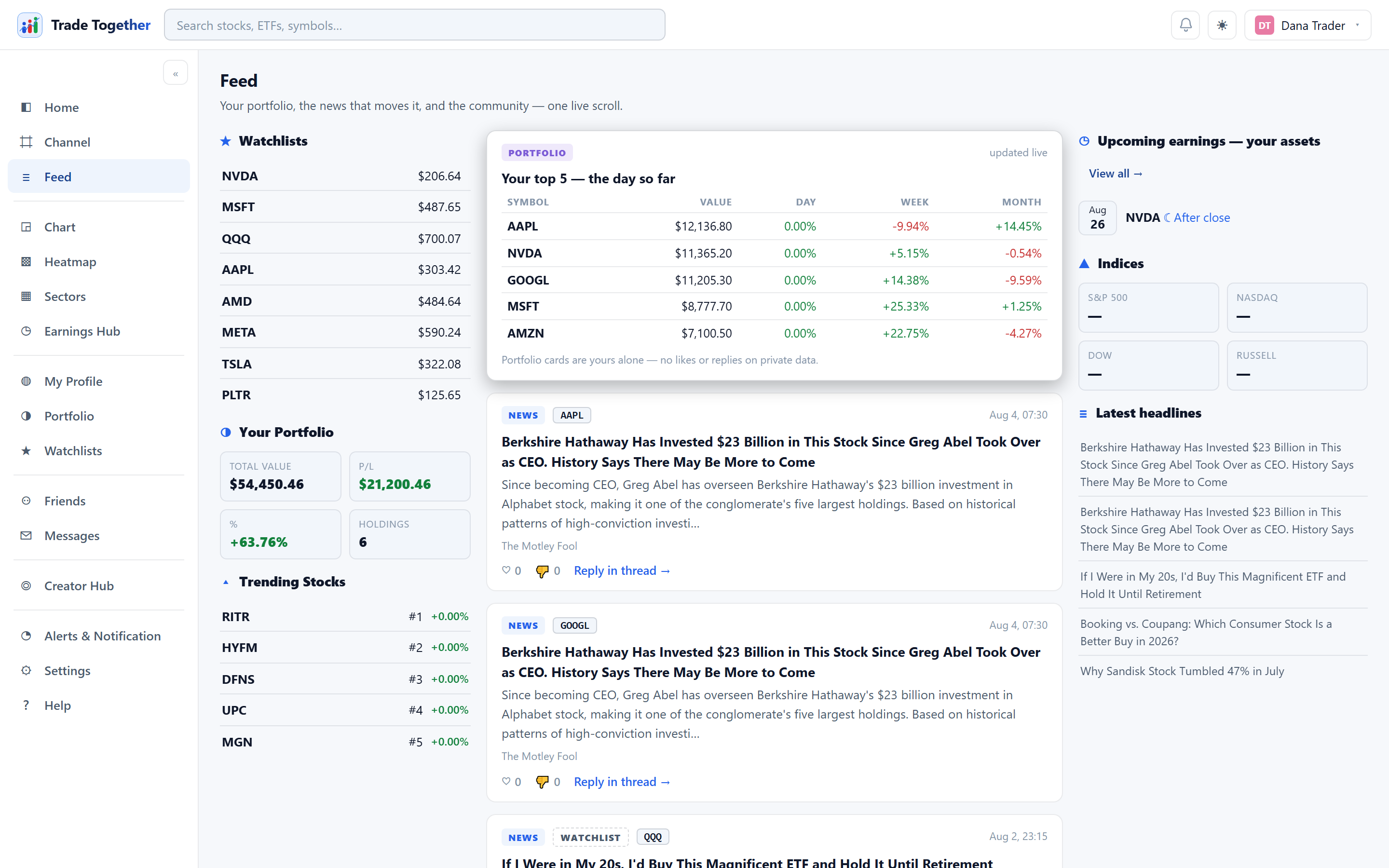
One scrolling column of everything relevant to what you hold and who you follow: news, posts from X about your symbols, creator posts, and popular channel posts. The rails beside it carry your own money and what is coming for it: the watchlist on the left; on the right your portfolio summary, directly above the earnings expected from the very holdings it counts, then the latest headlines. Trending names and the index tiles moved to Home, which owns the whole-market questions.
News inside the Feed refreshes every 15 minutes. Not faster, and the reason is a hard limit rather than a preference: the news provider allows five requests a minute and each symbol costs one, so a shorter cycle would spend the whole allowance on headlines and leave none for prices.
On a brand-new account — nothing held, nothing watched, nobody followed — the Feed still has something in it: the popular channel posts and the creator posts, which do not depend on you. What is missing is everything keyed to your symbols, and the rails beside the stream are mostly empty.
24.1 The portfolio card
Pinned at the top of the stream: your top five holdings with their value and their day, week and month change. It flashes green or red as prices update. It is yours alone — there are no likes or replies on it, because it is private data.
24.2 Cards and how they refresh
Each card is labelled by kind — NEWS, CREATOR, POPULAR, WATCHLIST. News and X posts carry like and dislike; creator and channel posts carry hearts and reply threads. Every symbol mentioned is a chip you can click to open its chart.
The feed refreshes about every 75 seconds. What happens next depends on where you are:
- Scrolled to the top — new stories slide in above what you were reading.
- Scrolled down — a “N new stories” pill appears instead. Click it and they merge in and the page scrolls up. Nothing moves under you while you are reading.
News cards look the way news looks on the chart page: the story's picture on the left, the headline, one short sentence from the article, and the source. Stories that arrive without a picture simply show as text.
24.3 Reporting and blocking
Every post carries a ⋮ at the end of its top row — in the feed, in channels, and in the phone apps. It opens two separate things, because they do two different jobs.
Report
Sends the post to us with a reason, and a box for anything you want to add in your own words. Eight reasons, and three of them are ones you will not find in a general social app:
- Spam or unwanted promotion
- Fake performance claims — someone claiming results they did not have
- Unlicensed advice — neither we nor our members are licensed to give it
- Undisclosed paid promotion — being paid to talk about a stock without saying so
- Scam or fraud
- Harassment or hate
- Impersonation
- Something else
The free-text box is optional and it is the part worth using: it tells us what a list of reasons cannot. A person reads every report, and we act within 24 hours.
Reports are anonymous. The person you reported is never told who reported them, and we will not tell you what we decided about their account — that is their business, not ours.
Block
Yours alone, and it takes effect immediately. You stop seeing their posts, replies and messages, and they stop seeing yours. They cannot reply to you or send you a message.
It works both ways on purpose. A block that only hid them from you would leave them free to read, quote and answer everything you write — which is the situation you were trying to leave.
They are not told, and they are not told if you undo it either. Settings → Privacy and safety lists everyone you have blocked and unblocks any of them in one click.